
什么是 Open Graph
Open Graph Protocol(开放图谱协议),简称 OG 协议。它是 Facebook 在 2010 年 F8 开发者大会公布的一种网页元信息(Meta Information)标记协议,属于 Meta Tag (Meta 标签)的范畴,是一种为社交分享而生的 Meta 标签,用于标准化网页中元数据的使用,使得社交媒体得以以丰富的“图形”对象来表示共享的页面内容。它允许在 Facebook 上,其他网站能像 Facebook 内容一样具有丰富的“图形”对象,进而促进 Facebook 和其他网站之间的集成。
最终效果
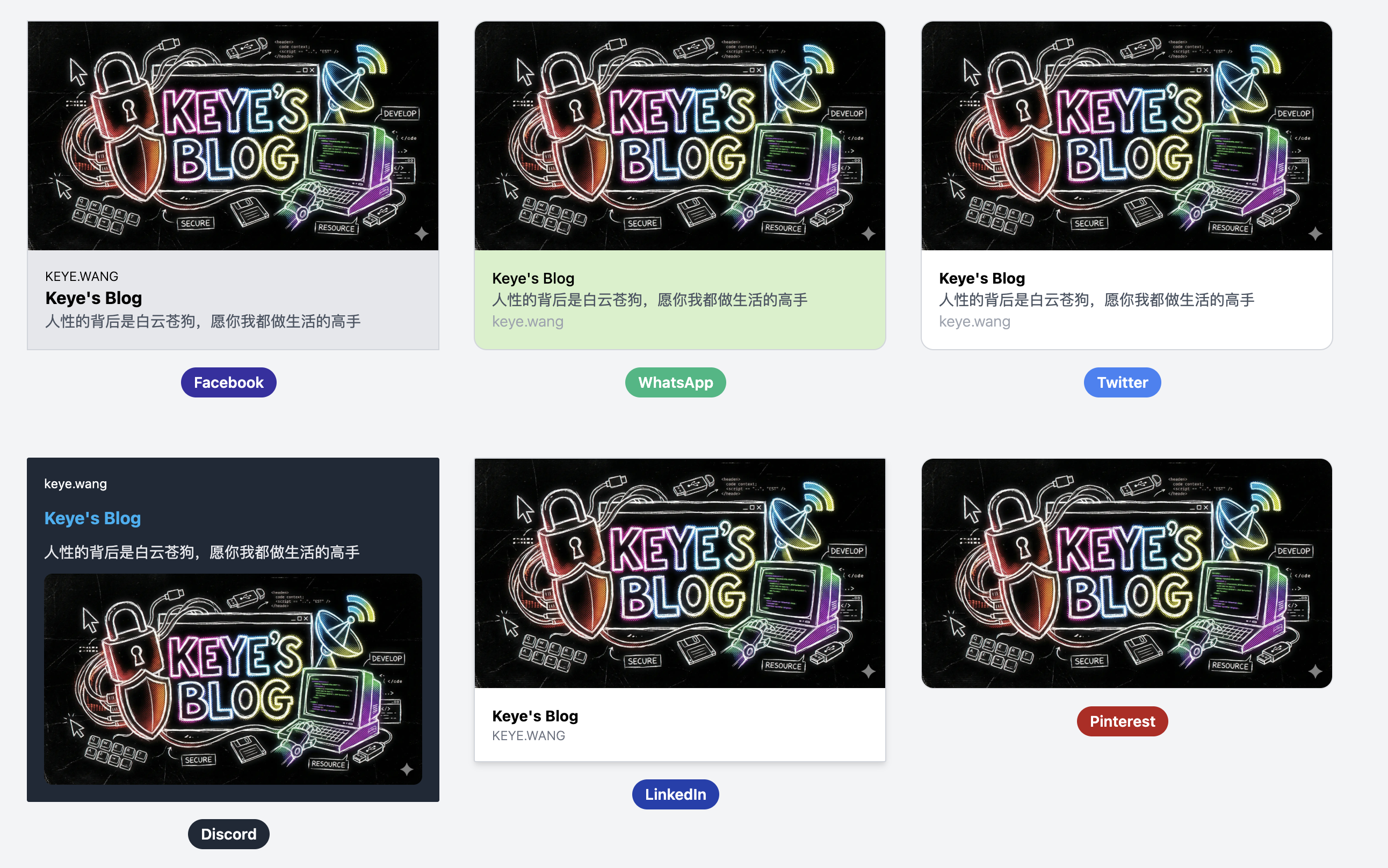
我的需求
正常情况下博客文章的 md 文件应该是这样的
---
title: "如何自动在 Astro 中为博文生成 Open Graph 图片"
slug: "auto-generate-og"

description: '这是一个对境外 eSIM 卡的汇总及分析。'
publishDate: '2025-07-13'
heroImage: 'https://xxx.xxx.xxx/xxx.webp'
---
但是我懒,想通过 HTML 做一个模板,自己写一个关键词,可以自动生成一张图片,类似下图
这样我写文章时候只需要这样写就行,不用去做图了(虽然做图也就半分钟,23333)
---
title: "如何自动在 Astro 中为博文生成 Open Graph 图片"
slug: "auto-generate-og"

description: '这是一个对境外 eSIM 卡的汇总及分析。'
publishDate: '2025-07-13'
heroImage: 'eSim 汇总'
---
方案选择
方案 A(最终采用的方案):用 Puppeteer 按照 HTML 模板在构建前批量截图生成 webp 图片
第一步 在 scripts/og-template.html 创建 HTML 模板(把文字处替换为占位符 {{TEXT}})
第二步 生成脚本
使用 gray-matter 读取每个 .md 的 frontmatter(title、heroImage)
判定:heroImage 非 URL 且非图片后缀时,当作文案;否则跳过
用 Puppeteer 打开模板(通过 file:// 绝对路径加载字体),把 {{TEXT}} 替换为文案,设定 960×480px 大小,截图为 webp 到
public/og/<slug>.webp
第三步 在 package.json 增加构建前钩子
"prebuild": "tsx scripts/generate-og.ts"(或 node --loader tsx)
第四步 页面接入
在
src/pages/post/[...slug].astro把 slug 一并传给 BlogPost在
src/layouts/BlogPost.astro内:若 heroImage 是 URL/图片,传原值;否则传/og/${slug}.webp给<BaseHead image=...>
优点
完全按照模板提供的 HTML/CSS 呈现,所见即所得(含 @font-face、描边、阴影、渐变)
输出体积小的 webp
不影响 md 文件中现有字段中的“图片 URL”的用法
注意点
- 建议文件命名按 post.slug,避免中文路径或空格
方案 B:用 Satori + Resvg 无浏览器生成
思路:用 satori 把 JSX 模板转为 SVG,再用 @resvg/resvg-js 渲染为 webp
优点:不依赖 Chromium,构建更“纯”,支持 Cloudflare 直接拉取代码部署
代价:需要把你的 HTML/CSS 改写成 JSX 风格(CSS 支持不如浏览器完整),调样式会略麻烦,阴影部分不能正确显示(可能有其他办法,没研究了)
遇到的问题及解决办法
我的 Blog 目前部署在 EdgeOne 的 Pages 上面,环境不支持 Puppeteer 。
解决办法
- 在
dev分支使用GitHub Actions执行pnpm prebuild生成/public/og/*.webp,把生成结果提交到deploy分支上传,EdgeOne 拉取 deploy 分支部署
开始操作
pnpm新增包
pnpm add -D puppeteer gray-matter
package.json新增一行预编译命令
"prebuild": "node scripts/generate-og.mjs",
- 新建文件
scripts/generate-og.mjs
import fs from 'node:fs';
import fsp from 'node:fs/promises';
import path from 'node:path';
import { fileURLToPath, pathToFileURL } from 'node:url';
import matter from 'gray-matter';
import puppeteer from 'puppeteer';
// Only run in GitHub Actions; skip elsewhere (e.g., Cloudflare Pages, EdgeOne Pages)
if (!process.env.GITHUB_ACTIONS) {
console.log('[generate-og] Non-GitHub CI environment detected, skipping.');
process.exit(0);
}
const __filename = fileURLToPath(import.meta.url);
const __dirname = path.dirname(__filename);
const projectRoot = path.resolve(__dirname, '..');
const contentDir = path.join(projectRoot, 'src', 'content', 'blog');
const publicDir = path.join(projectRoot, 'public');
const ogDir = path.join(publicDir, 'og');
const templatePath = path.join(projectRoot, 'scripts', 'og-template.html');
const fontPathCandidates = [
path.join(publicDir, 'fonts', 'DingTalk JinBuTi.ttf'),
path.join(publicDir, 'fronts', 'DingTalk JinBuTi.ttf'), // tolerate directory typo
];
function isUrlOrImagePath(value) {
if (!value || typeof value !== 'string') return false;
const lower = value.toLowerCase();
const isUrl = /^https?:\/\//.test(lower) || lower.startsWith('data:');
const isImg = /(\.png|\.jpg|\.jpeg|\.webp|\.gif|\.svg)(\?.*)?$/.test(lower);
return isUrl || isImg;
}
function escapeHtml(str) {
return String(str)
.replaceAll('&', '&')
.replaceAll('<', '<')
.replaceAll('>', '>')
.replaceAll('"', '"')
.replaceAll("'", ''');
}
async function ensureDir(dir) {
await fsp.mkdir(dir, { recursive: true });
}
async function* walkMarkdownFiles(dir) {
const entries = await fsp.readdir(dir, { withFileTypes: true });
for (const entry of entries) {
const full = path.join(dir, entry.name);
if (entry.isDirectory()) {
yield* walkMarkdownFiles(full);
} else if (entry.isFile() && /\.md$/i.test(entry.name)) {
yield full;
}
}
}
async function generateForPost(mdPath, browser, templateHtml) {
const rel = path.relative(contentDir, mdPath);
const slug = rel.replace(/\\/g, '/').replace(/\.md$/i, '');
const raw = await fsp.readFile(mdPath, 'utf8');
const { data } = matter(raw);
const heroImage = data?.heroImage;
const title = data?.title;
// 跳过:未填写 heroImage,或 heroImage 已是 URL/图片路径
if (!heroImage || isUrlOrImagePath(heroImage)) return { skipped: true, slug };
const text = String(heroImage || title || slug);
// Find first existing font path from candidates
const fontPath = fontPathCandidates.find(p => fs.existsSync(p));
let fontFace = '';
if (fontPath) {
try {
const fontBuf = await fsp.readFile(fontPath);
const fontDataUrl = `data:font/ttf;base64,${fontBuf.toString('base64')}`;
fontFace = `@font-face {\n font-family: 'Jinbuti';\n src: url('${fontDataUrl}') format('truetype');\n font-weight: 400;\n font-style: normal;\n font-display: swap;\n}`;
} catch {}
}
const html = templateHtml
.replace('{{FONT_FACE}}', fontFace)
.replace('{{TEXT}}', escapeHtml(text));
const page = await browser.newPage();
try {
await page.setViewport({ width: 960, height: 480, deviceScaleFactor: 1 });
await page.setContent(html, { waitUntil: 'networkidle0' });
// Ensure web fonts are loaded before taking screenshot (avoid tofu boxes)
try {
await page.evaluate(async () => {
// Wait for all fonts
await document.fonts.ready;
// Explicitly load our font at a large size
await document.fonts.load("400 120px 'Jinbuti'");
});
} catch {}
await ensureDir(ogDir);
const outPath = path.join(ogDir, `${slug}.webp`);
await page.screenshot({ path: outPath, type: 'webp' });
return { skipped: false, slug, outPath };
} finally {
await page.close();
}
}
async function main() {
const templateHtml = await fsp.readFile(templatePath, 'utf8');
const browser = await puppeteer.launch({
headless: 'new',
args: ['--no-sandbox', '--disable-setuid-sandbox'],
});
try {
for await (const file of walkMarkdownFiles(contentDir)) {
await generateForPost(file, browser, templateHtml);
}
} finally {
await browser.close();
}
}
main().catch((err) => {
console.error('[generate-og] Failed:', err);
process.exitCode = 1;
});
- 新建文件
scripts/og-template.html
<!DOCTYPE html>
<html lang="zh-CN">
<head>
    <meta charset="UTF-8">
    <meta name="viewport" content="width=device-width, initial-scale=1.0">
    <title>OG Template</title>
    <style>
        {{FONT_FACE}}

        body {
            font-family: 'Jinbuti', system-ui, -apple-system, Segoe UI, Roboto, Noto Sans, Arial, sans-serif;
            display: flex;
            justify-content: center;
            align-items: center;
            min-height: 100vh;
            margin: 0;
            background-color: #f0f0f0;
        }

        .gradient-box {
            width: 960px;
            height: 480px;
            background: linear-gradient(135deg, #667eea, #764ba2);
            border-radius: 12px;
            display: flex;
            justify-content: center;
            align-items: center;
            color: white;
            font-size: clamp(50px, 14vw, 200px);
            line-height: 1;
            font-weight: 900;
            text-align: center;
            box-shadow: 0 10px 20px rgba(0, 0, 0, 0.15);
            -webkit-text-stroke: 1px rgba(0, 0, 0, 0.2);
            paint-order: stroke fill;
            text-shadow: 0 6px 12px rgba(0, 0, 0, 0.35);
            letter-spacing: -0.02em;
            padding: 20px;
            box-sizing: border-box;
        }
    </style>
</head>
<body>
    <div class="gradient-box" id="text">{{TEXT}}</div>
</body>
</html>
- 修改文件
src/layouts/BlogPost.astro
import Container from "../components/Container.astro";
import MarkdownBody from "../components/MarkdownBody.astro";

type Props = CollectionEntry<'blog'>['data'] & { slug: string };

const { title, description, publishDate, updatedDate, heroImage, slug } = Astro.props;

//判断是否需要替换
function isUrlOrImagePath(value: string) {
    if (!value) return false;
    const lower = value.toLowerCase();
    const isUrl = /^https?:\/\//.test(lower) || lower.startsWith('data:');
    const isImg = /(\.png|\.jpg|\.jpeg|\.webp|\.gif|\.svg)(\?.*)?$/.test(lower);
    return isUrl || isImg;
}

// 替换heroimage,如果没有heroimage字段使用默认图片
const ogImage = heroImage
    ? (isUrlOrImagePath(heroImage) ? heroImage : `/og/${slug}.webp`)
    : undefined; // 交给 BaseHead 使用其默认 /og.webp
---

<BaseLayout>
	<BaseHead slot="head" title={title} description={description} image={ogImage} />
	<Header />
- 新增 Github Action文件
.github/workflows/deploy.yml
name: Generate OG & Push to deploy

on:
push:
branches: [ myblog ]
paths:
- 'src/content/blog/**/*.md'
- 'scripts/**'
- 'package.json'
- 'pnpm-lock.yaml'
- 'src/**'
- 'public/**'
workflow_dispatch: {}
permissions:
contents: write

jobs:
build:
runs-on: ubuntu-latest
steps:

- name: Checkout repository
uses: actions/checkout@v4
with:
fetch-depth: 0

- name: Setup PNPM
uses: pnpm/action-setup@v4
# Respect version from package.json `packageManager`

- name: Setup Node.js
uses: actions/setup-node@v4
with:
node-version: 20
cache: 'pnpm'

- name: Install dependencies
run: pnpm install --frozen-lockfile

- name: Approve puppeteer build
run: pnpm approve-builds puppeteer

- name: Install Chrome for Puppeteer
run: pnpm exec puppeteer browsers install chrome

- name: Generate OG images
run: node scripts/generate-og.mjs

- name: Prepare deploy branch
run: |
git config user.name "github-actions[bot]"
git config user.email "41898282+github-actions[bot]@users.noreply.github.com"
# Switch to deploy branch at current commit tree
git checkout -B deploy
# Stage any generated assets

git add -A
# Commit only if there are staged changes (e.g., new/updated OG files)
if ! git diff --cached --quiet; then
git commit -m "build: deploy with generated OG images"
fi

# Push branch pointer and commit (if any)
git push --force-with-lease origin deploy
最终实现
代码仓库有两个分支:dev、deploy。正常提交代码到 dev 分支,dev 会通过 Github Action 创建含有 Open Graph 图片的最终仓库推送到 deploy 分支。Edge One Pages 会直接拉取 deploy 分支后 Build 。
其实最方便的方式还是直接通过 Github Action 编译出 dist 后推送到 Edge One Pages 。整个部署过程都在 Github Action 。
其实最方便的方式还是直接通过 Github Action 编译出 dist 后推送到 Edge One Pages 。整个部署过程都在 Github Action 。